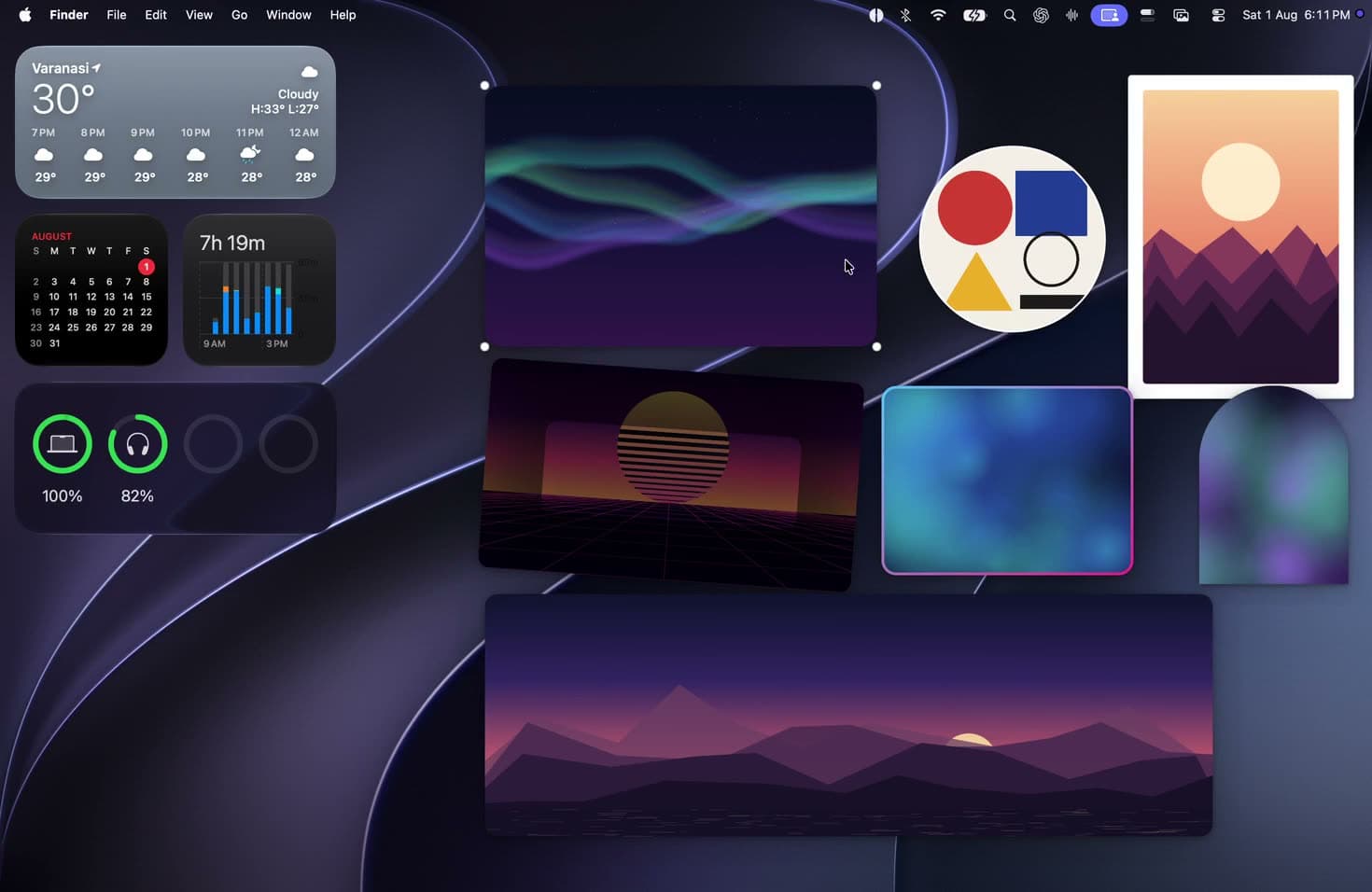
No cropping
Arras keeps the full image visible. No trimmed edges, filler, or black bars.
Your photos. Not squares.
Put any photo on your desktop at its original shape. Resize it, layer it, or rotate several photos in the same spot.
Free · Open source · Native · No telemetry
The useful part
Arras keeps the full image visible. No trimmed edges, filler, or black bars.
Panoramas stay wide. Portraits stay tall. Each widget matches its photo.
Put a photo behind desktop icons, above them, or over your other windows.
Rotate a set of images in one widget, or keep GIFs and APNGs moving.
Direct comparison
The Photos widget fits images into Apple's supported widget sizes. Arras gives the window the same proportions as the source image.


| Capability | macOS Photos widget | Arras |
|---|---|---|
| Photo shape | Fixed widget formats | Original aspect ratio |
| Choose an exact image | Depends on Photos widget controls | Paste, drag, Photos, or capture |
| Window placement | Desktop or Notification Center | Below icons through above apps |
| Rotation control | Managed by the Photos widget | Click, 30 seconds, hourly, or custom |
| Source and price | Included with macOS | MIT licensed and free |
More control
These are useful once the photos are on your desktop. You do not need to configure them before you start.
Photos align to screen edges, each other, and app windows. Guides show the exact alignment while you drag.
Press ⌘V, drop image files on the menu bar icon, choose from Photos, or pin part of your screen.
Choose a preset or set the mask, mat, shadow, border, vignette, opacity, and tilt yourself.
Move or resize a widget while the app you are working in stays active.
memory
~20 MB
idle cpu
~0%
requires
macOS 14+
silicon
Apple only
license
MIT
telemetry
none
Install
Arras is distributed outside the Mac App Store and is not notarized. macOS may ask for one approval before the first launch. Both methods below install the same public release from GitHub.
The first two commands install Arras. The last command removes the downloaded-file quarantine flag from Arras only, so macOS can open it.
macOS may stop the first launch because the current build is not notarized. Approve Arras once in Privacy & Security, then open it normally.
It has had three names
The name changed to avoid confusion with Tableau's data-visualization product. Arras kept the same bundle identifier, settings, saved photos, and in-place update path, so the rename did not create a separate app.
Photo Widget OSX
2026
Tableau
→ v2.3.0
Arras
v2.3.1 →
Photo Widget OSX described the file type. Tableau collided with a data-visualization brand. Arras is a woven wall hanging, which is closer to the point of arranging pictures on a surface.
FAQ
Practical answers about features, compatibility, pricing, privacy, and installation.
Yes. macOS supports widgets on the desktop and in Notification Center. Apple says to Control-click the wallpaper, choose Edit Widgets, then click a widget or drag it to the position you want.
Arras uses independent borderless desktop windows rather than Apple’s fixed WidgetKit frames. Each photo can keep its own proportions, position, opacity, and layering instead of being confined to a system widget size.
SourcesApple Support: Add and customize widgets on MacArras source and technical documentation
For a built-in macOS widget, Control-click the wallpaper, choose Edit Widgets, find the Photos widget, and click or drag the size you want onto the desktop.
With Arras, install the app and add an exact photo from its menu bar icon, paste a copied image with Command-V, drag image files onto the menu bar icon, or import from Photos. Arras creates a separate desktop photo at the image’s true aspect ratio.
SourcesApple Support: Add and customize widgets on MacArras source and technical documentation
Apple notes that only widgets with an Edit option let you change what they show, so control over a specific image depends on the widget and macOS version.
Arras lets you choose the exact image directly: paste it, drag its file in, select it from Photos, capture part of the screen, or import a PDF page. The selected photo keeps its saved size and desktop position.
SourcesApple Support: Add and customize widgets on MacArras source and technical documentation
Yes. Arras displays each desktop photo at its original aspect ratio, so a panorama remains wide and a portrait remains vertical without forced cropping, black bars, or a fixed square frame.
You can drag a corner to resize while the aspect ratio stays locked. For rotating photo sets, Dynamic sizing lets each image use its own true proportions, while Fixed sizing is available when you intentionally want a locked frame.
For a standard macOS widget, Control-click it and choose Remove Widget, or open Edit Widgets mode and click its Remove button.
For an Arras photo, right-click the photo window and choose Remove. Removing one Arras image does not reset the positions, sizes, or settings of the other desktop photos.
SourcesApple Support: Add and customize widgets on MacArras source and technical documentation
For a standard macOS widget, Control-click it to use any available Edit option, choose another supported size, or remove it. Apple also provides desktop settings for widget visibility and color treatment.
Arras adds per-photo controls for opacity, layering, locked placement, shape masks, mats, shadows, borders, vignettes, tilt, and Gallery, Polaroid, Minimal, or Modern presets. Photos can also sit behind desktop icons or float above other windows.
SourcesApple Support: Add and customize widgets on MacArras source and technical documentation
Yes. Select several images to create one desktop photo Space that crossfades on click or on a schedule, including every 30 seconds, hourly, daily, or a custom interval down to five seconds.
Dynamic sizing preserves each image’s individual aspect ratio and saved position. Fixed sizing is also available when you want every image to fill the same locked frame.
The current Arras build is distributed outside the Mac App Store and is not notarized, so macOS may pause the first launch. This is a Gatekeeper check on the distribution method.
After trying to open Arras once, go to System Settings, Privacy & Security, and click Open Anyway. You only need to approve that installed copy once. The source and release files are public on GitHub.
SourcesApple Support: Safely open apps on your MacArras source and technical documentation
The current Arras release requires macOS 14 Sonoma or later and its downloadable build supports Apple Silicon Macs. The project documentation says an Intel build can be compiled from source.
SourcesArras source and technical documentationLatest Arras release
Yes. Arras is free and its source is published on GitHub under the MIT License. You can install the current release from its DMG or with the Homebrew commands documented in the repository.
SourcesArras source and technical documentationLatest Arras release